Expodition.
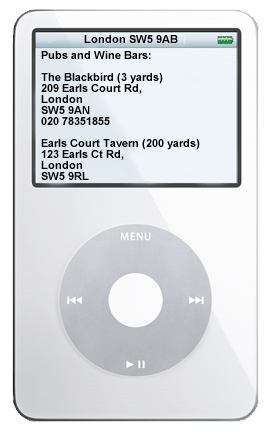
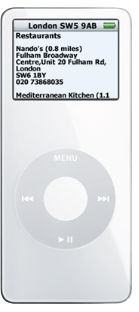

I launched Expodition (a portmanteau of expedition and iPod) on April 11th, 2006 to provide a unique service to users of Apple's iPod. Here’s the story of how the website came about:
For many years, I've been intrigued by the idea of a handheld device that could provide location and profile specific information to the user.
Indeed, back in the early nineties when Apple released a revolutionary handheld computer called Newton, I liaised with them while developing my ideas for a location-based service called NewtonPoint. The project was stillborn, however, due to the fact that the infrastructure required would have made it much too costly to implement.
Over the years, the premise always remained with me - and after a trip to New York with my wife in 2005, I realized how Apple’s iPod could be used to fulfil this need.
As with many people, when going on a trip, I like to have a fair idea of what's in and around the area that I'll be visiting. So a few days before we left, I could be found scouring the internet, downloading guides from different web sites, cutting and pasting stuff into different documents, highlighting places to eat, places to visit, entry costs, etc.
I ended up with a mishmash of information which quite possibly would have worked well - had I not left it on the kitchen table on the morning of our departure. My wife was not impressed.
One of the things I definitely did not forget was my iPod. And so as we waited in the departure lounge at London's Heathrow airport, I quietly slipped in my white buds and listened to a bit of Otis. While clicking through the menu options, I started wondering why I hadn't used my iPod’s Notes feature to store the information that I had spent hours collating just days before. Notes supported HTML after all, which was awesome for formatting and laying out of content, and would allow me to create mini-wiki pages of information.
During the seven hour flight, my creative juices started flowing - and I contemplated the different ways in which I could implement this as an internet-based service. And by the time we touched down at JFK, Expodition was born.
I built the Expodition website and service from scratch over the next eight months, including the website design, architecture, and PHP/mySQL back-end.
I collaborated with a company called upmystreet.com (no longer active) who provided the location information. Expodition used the upmystreet API to pull the specific info for each customer, depending on where they were visiting.
The Expodition back-end automatically packaged the information into an HTML file, and sent the file to the customer’s email address.
The customer would then download the file, and sync it to their iPod.
Expodition worked well for its first year of life. I gained new and repeat customers, which was awesome to see. Unfortunately, in June 2007, Apple released the first iPhone, which was quickly followed up with the iPod Touch. Both of these devices had internet access and maps, so Expodition’s USP (Unique Selling Point) was lost. By the time 2008 came around, traffic to Expodition.com slowed to a trickle, and it was obvious that it had become yet another victim to the iPhone’s phenomenal success.
I closed Expodition down in late 2008. What a great journey. And what a great learning experience!
See Expodition.com in the Wayback Machine - the Internet Archive.
Try it!
If you have an iPod, here’s a free Pod SnapShot (PSS) that you can sync to your iPod to see how Expodition worked. Just follow these steps to get going:
TIP: This Pod SnapShot was created in 2006, and covers the postcode area of N1 0PS in London. Because the Pod SnapShot was created almost 20 years ago, the businesses, restaurants, and local attractions might no longer be available!
Download the Pod SnapShot to your PC or Mac.
Double-click the attachment to open it with Winzip, (on a PC) or Stuffit, (on a Mac), then extract, or save the file to your desktop. Ensure that you preserve the directory structure of \Pod SnapShots\Postcodes\.
Connect your iPod to your computer, and browse it in 'disk use' mode. You can do this using Windows Explorer, or the Finder on macOS. This will enable you to see various folders on your iPod such as 'Notes'.
Drag the Pod SnapShots folder from your desktop to the Notes folder on your iPod.
You can now browse the location info to see restaurants, parks, pubs, wine bars, cash machines, banks, theatres, hotels, and more in and around N1 0PS.
BONUS POINTS: If you don’t have an iPod to test with, you can view the contents of the Pod SnapShot with any HTML viewer.